
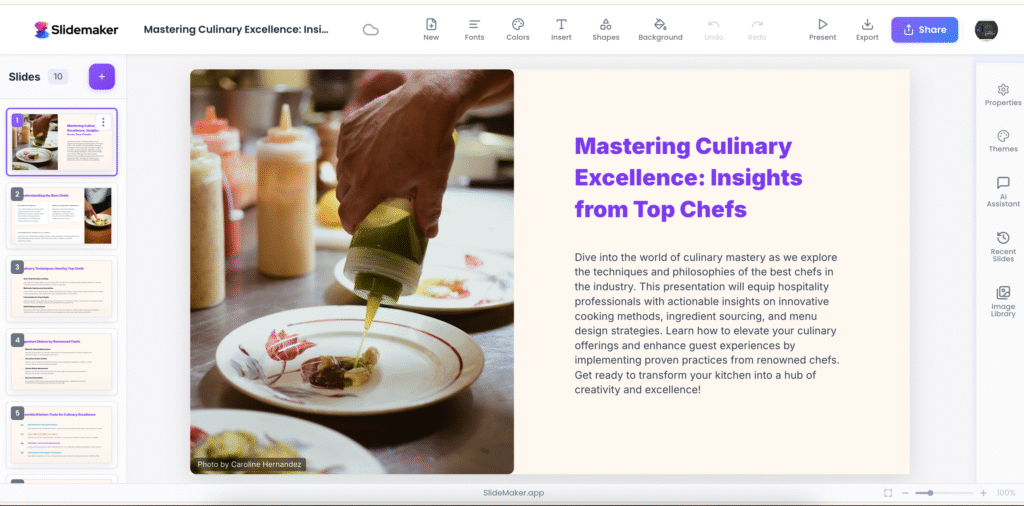
Building a presentation would take hours of formatting, adjusting layouts and matching graphics. Whether you are a student who is getting ready to start the lesson, a marketer selling an idea, or a businessman who needs to summarise some information, it can easily take an afternoon to create a slide. Meet AI presentation maker, your intelligent shortcut to beautiful, professional slides without the stress.
The Problem with Manual Slide Creation
Conventional slide design is time-consuming. You begin with a plain canvas, you take minutes in selecting fonts, searching similar images, and changing alignments, before you have even typed anything. The result? Poor designs, deadline slips and creative burnout. Despite modern presentation software, the manual process slows down productivity and focuses on what you are saying.
Automation makes everything different there. You can now find yourself explaining your idea with a few sentences, and the AI takes care of the rest instead of constructing them one by one.
How an AI Presentation Maker Works
An AI presentation maker uses natural language processing to turn your text input into fully formatted slides. You simply enter a topic or paste your content, and the tool automatically creates slide titles, bullet points, and relevant visuals using smart templates. It functions as an automatic slide generator, analysing your words to identify themes, visuals, and layouts that make sense for your audience.
There are even sites such as SlideMaker, where you do not even have to log in or download anything. It is a web-based slide program that allows users to make presentations which look professional within a few seconds. You are able to create several variations, customise designs, and download the final deck in one second. This smooth process avoids time spent on the setup and introduces professional creativity to all people, not just designers.
Key Benefits of Using an AI Presentation Maker Free Tool
The free version of an AI presentation maker lets anyone, students and business people alike, make beautiful slides and spend no money on it. This is what makes it so powerful:
- Time Efficiency: The automatic slide generator takes less than a minute to generate a complete deck.
- Professional Quality: In-built smart templates make all the slides appear coherent and presentation-ready.
- Ease of use: This online slide tool is web-based, which means that it can be used anywhere and on any device.
- On-Demand Creativity: You do not have to brainstorm different layouts, but the AI offers a variety of design options on its own.
To a professional, these tools eliminate repetitive design tasks and allow time to concentrate on stories, data insights and delivery.
Why It’s a Game-Changer for Professionals and Students
Imagine you have a report due in an hour. Rather than having a panic attack, you open an AI presentation maker, enter your text, and get professional slides in a second. Students can impress with well-polished images, marketers are able to sell more quickly, and educators can explain complex concepts more efficiently.
The best part? The free AI presentation maker tools democratise great design. You do not have to be technical or use expensive software. In the case of small teams, it translates to better teamwork and brand strength. To people, it represents greater time to think, not format.
Conclusion
AI is redefining how we communicate ideas. With tools like SlideMaker.app, you can skip tedious formatting and move straight to creative impact. This AI presentation maker free platform empowers users to craft professional slides in seconds using an automatic slide generator that understands your content and your time’s value. Try SlideMaker.app today, your next stunning presentation is just one click away.
FAQs
1. How does an AI presentation maker save hours in slide creation?
It software automates all aspects, including slide format, images, and so what once did not take hours now takes minutes.
2. Are there limitations when using an AI presentation maker free version?
The free versions may have restrictions on the number of slides or types of exports, but they are ideal for simple projects and training to use the tool.
3. Can AI automatically generate charts and visuals for my slides?
Yes, the majority of the presentation programs will utilise AI to automatically match the applicable icons, graphs and images with the text you have entered.
4. How does AI ensure slides look professional without manual design?
AI uses design guidelines such as distance, color contrast, and alignment of typography, such that each slide appears clean and professional.