
How SlideMaker Turns Your Ideas into Professional, Creative Presentations
Amazing concepts tend to be lost in uninspiring presentations. In presentations, balancing creativity and professionalism can be quite difficult, whether you are a student making a project, a marketer trying to sell a campaign, or a teacher making a visual lesson presentation. Manual design is time-consuming, labour-intensive and detail-oriented, which not all people can afford to be so. This is where SlideMaker, a modern AI slide maker, comes in and transforms the way of presentation design.
The Challenge of Designing Creative yet Professional Slides
Older presentation tools are heavy on templates and manual formatting. You choose a design, change fonts, resize pictures and hope everything will appear to come together. This process consumes hours for the majority of people. It is hard to be creative and, at the same time, make everything look smooth and even. In addition, it is difficult to make their presentations attractive even to experienced users using several slides.
A run-of-the-mill slide producer or presentation tool may assist in organisation, but seldom in creative liberation. The speed and quality of design must be selected very often. The difference between the imagination and the action is the very thing that SlideMaker was designed to bridge.
How SlideMaker Elevates Your Ideas with AI-Powered Design
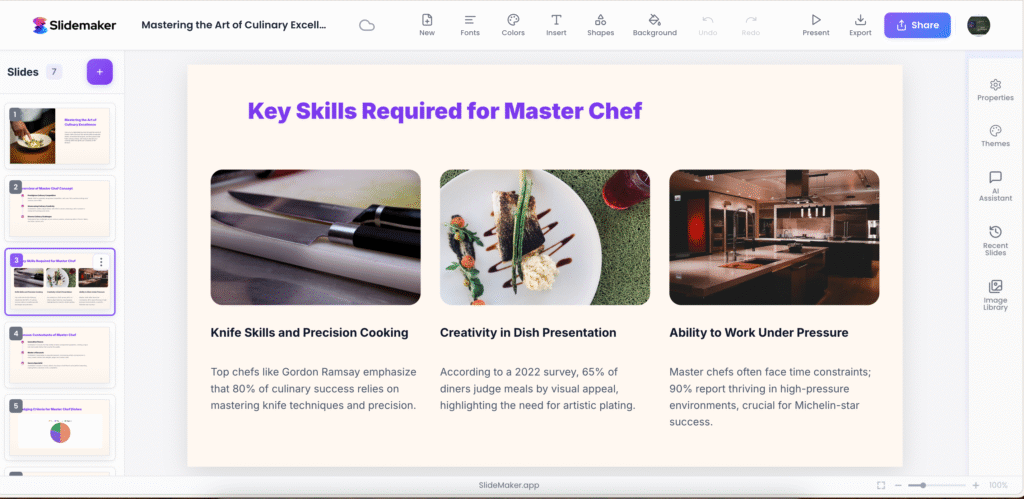
SlideMaker is not just any other slide maker; it is an intelligent AI-based presentation tool that helps to bring your ideas into reality and convert them into structured, engaging slides. All you should do is write about your topic or paste your work, and the AI slide-based generator generates personal slide outlines according to your theme and tone.
The only difference is that it integrates creativity and automation in a very seamless way. The system has an AI-based logic of design to select fonts, color palettes, and visual hierarchies based on your message. You will be able to create the slides without much effort, change the themes, and modify the visuals without having any advanced background in design.
Better still, SlideMaker is a free slide tool which simply operates on the internet. No downloads, no logins, no impediments. In a few seconds, you have access to AI-generated slide creation, which is professional and effortless. It does not matter whether you are preparing a school presentation or a business pitch; SlideMaker can help you make your ideas work beautifully and efficiently.
Why SlideMaker Is the Ideal AI Presentation Tool for Every Creator
SlideMaker is an AI presentation tool was designed for anyone who values creativity, clarity, and convenience. Students, educators, and professionals all find it a game-changer. Here’s why:
- Save time without sacrificing creativity: Generate and design slides easily using smart AI-driven templates.
- Make professional output: Slides are smooth, unified and attractive with inbuilt design brain.
- Complete customisation: Select a custom slide layout, customise the themes and feel free to edit the text and make it your own.
- Cross-platform compatibility: The AI slide maker will allow exporting and editing both Google Slides and PowerPoint slides.
- Free and open source: SlideMaker is a free slide software, which means that it has high-quality features without the usual paywall or subscription fee.
SlideMaker not only make presentations easier, but it enables their creators to concentrate on their concepts, rather than designing. It integrates automation with personalisation to make sure your slides look as good as your message sounds.
Conclusion
SlideMaker is a middle ground between creativity and professionalism, allowing users to build eye-catching visuals in a few minutes and make them presentable. This AI slide maker is the powerhouse that allows anyone (students and businesses) to be a slide creator with intelligent custom slide layouts and a free slide software experience. Today, visit SlideMaker and see the ease, creativity and inspiration that can be true in presentation design.
FAQs
1. How can SlideMaker help me create visually appealing presentations?
SlideMaker uses AI to select colour themes, layouts, and visuals that align with your content, giving you beautiful, cohesive slides every time.
2. What design customisation options are available in an AI slide maker?
You can modify fonts, colors, layouts, and add or remove elements from custom slide layouts to match your style and goals.
3. Can I use SlideMaker for both Google Slides and PowerPoint?
Yes, it is possible to download and edit presentations made in SlideMaker in Google Slides and PowerPoint models.
4. How do AI slide makers enhance creativity compared to traditional tools?
An AI-based presentation tool like SlideMaker can eliminate repetitive labour, and suggest some of the more creative designs, so you can focus on your message and storytelling.